 BanditAI
Kansas 1099 Filing Requirements
Meet your Kansas 1099 filing requirements efficiently with TaxBandits!
Simplify Your Kansas 1099 Filing with TaxBandits
- Complete Kansas tax filing compliance
- We support state-only filing
- Free retransmission of rejected returns
- No cost corrections for Kansas 1099 forms
E-file at just $0.95/form
1099 Forms Required by Kansas State
Kansas requires businesses to file various 1099 forms to report payments made to individuals and other entities.
Form 1099-NEC
Non-Employee Compensation
Form 1099-MISC
Miscellaneous Income
Form 1099-K
Card Transactions
Form 1099-INT
Interest Income
Form 1099-DIV
Dividends Distributions
Form 1099-R
Retirement Plans
Form 1099-G
Government Payments
Form 1099-B
Broker and Barter Exchange Transactions
Form 1099-OID
Original Issue Discount
Form W-2G
Gambling Winnings
The state also requires Form W-2. Learn more
Kansas Filing Requirements for 1099-NEC, MISC, K, INT, DIV, R, G, B, OID, and W-2G
| Condition | State Income Threshold | Filing Method | Additional Forms | Due Date |
|---|---|---|---|---|
| If Kansas Tax Was Withheld | More than $0 | Direct State Filing | Form KW-3 | February 01, 2027 |
| If NO Kansas Tax Was Withheld | Equal to or more than the federal threshold | Direct State Filing | Form KW-3 | February 01, 2027 |
| Less than the federal threshold | No Filing Required | |||
Ready to file the 1099 Form with the Kansas State?
Information Required to File 1099 Forms with Kansas
Discover the key information needed to file Form 1099 with the State of Kansas.

1. State/Payer’s state number
The payer’s state identification number refers to the Kansas Withholding
Account Number.
Kansas State ID Format:
- 15 digits starting with 036 followed by 9 digits, and a hyphen followed by F01 (For example: “036” - Federal EIN - “F01”)
2. State income
The total amount of taxable income that is subject to the Kansas state income tax.
3. State tax withheld
The total amount of state income taxes withheld from the recipient’s income.

1. State/Payer’s state number
The payer’s state identification number refers to the Kansas Withholding
Account Number.
Kansas State ID Format:
- 15 digits starting with 036 followed by 9 digits and a hyphen, followed by F01 (For example: “036” - Federal EIN - “F01”)
2. State distribution
Report the total payment amount subject to state tax.
3. State tax withheld
The total amount of state income taxes withheld from the recipient’s income.
4. Name of locality
Specify the city or locality name, if applicable.
5. Local distribution
Report the total payment amount subject to local tax.
6. Local tax withheld
Enter the amount of local income tax withheld.

1. State/Payer’s state number
The payer’s state identification number refers to the Kansas Withholding
Account Number.
Kansas State ID Format:
- 15 digits with starting 036 followed by 9 digits and a hyphen, followed by F01 (For example: “036” - Federal EIN - “F01”)
2. State winnings
Report the total winnings subject to Kansas state tax.
3. State income tax withheld
Enter the amount of Kansas state income tax withheld.
4. Name of locality
Specify the city or locality name, if applicable.
5. Local winnings
Report total winnings subject to local tax.
6. Local income tax withheld
Enter the amount of local income tax withheld.
File with the Kansas state in minutes using TaxBandits!
Kansas Annual Withholding Tax Return – Form KW-3
Form KW-3 is an Annual Reconciliation used to report the total income taxes withheld from employees/contractors and taxes remitted to the state.
It's also used to claim an overpayment refund or pay if the taxes are underpaid.
Information Reported on Form KW-3:
- Total Kansas tax withheld on W2/1099
- Total payments and overpayments
- Total withholding payments/credits
- Net amount, penalty, and interest

Once you've filed your 1099 forms with TaxBandits, remember to submit Form KW-3 to the Kansas state agency separately before the deadline.

TaxBandits – Simplifying Kansas State 1099 Compliance
TaxBandits supports the filing of 1099 forms directly with the Kansas Department of Revenue, ensuring compliance with state regulations.

Supports State-Only Filing
With TaxBandits, you can file 1099 forms directly with your state, even if you didn’t file your federal 1099s with us.

Complete Compliance
Stay compliant with federal and state filing requirements, corrections, and deadlines, all efficiently managed in one place with TaxBandits.

State Form PDFs
Conveniently access and download Kansas 1099 form PDFs for recordkeeping, ensuring you always have the forms
you need.

Free Resubmissions
If the Kansas Department of Revenue rejects your 1099 forms, you can correct the errors and resubmit them free of charge.
Start filing your Kansas 1099 returns with TaxBandits by creating an account!
How to File Form 1099 with Kansas?
Create your free account and follow these simple steps to effortlessly e-file your 1099 with the federal and the state of Kansas!

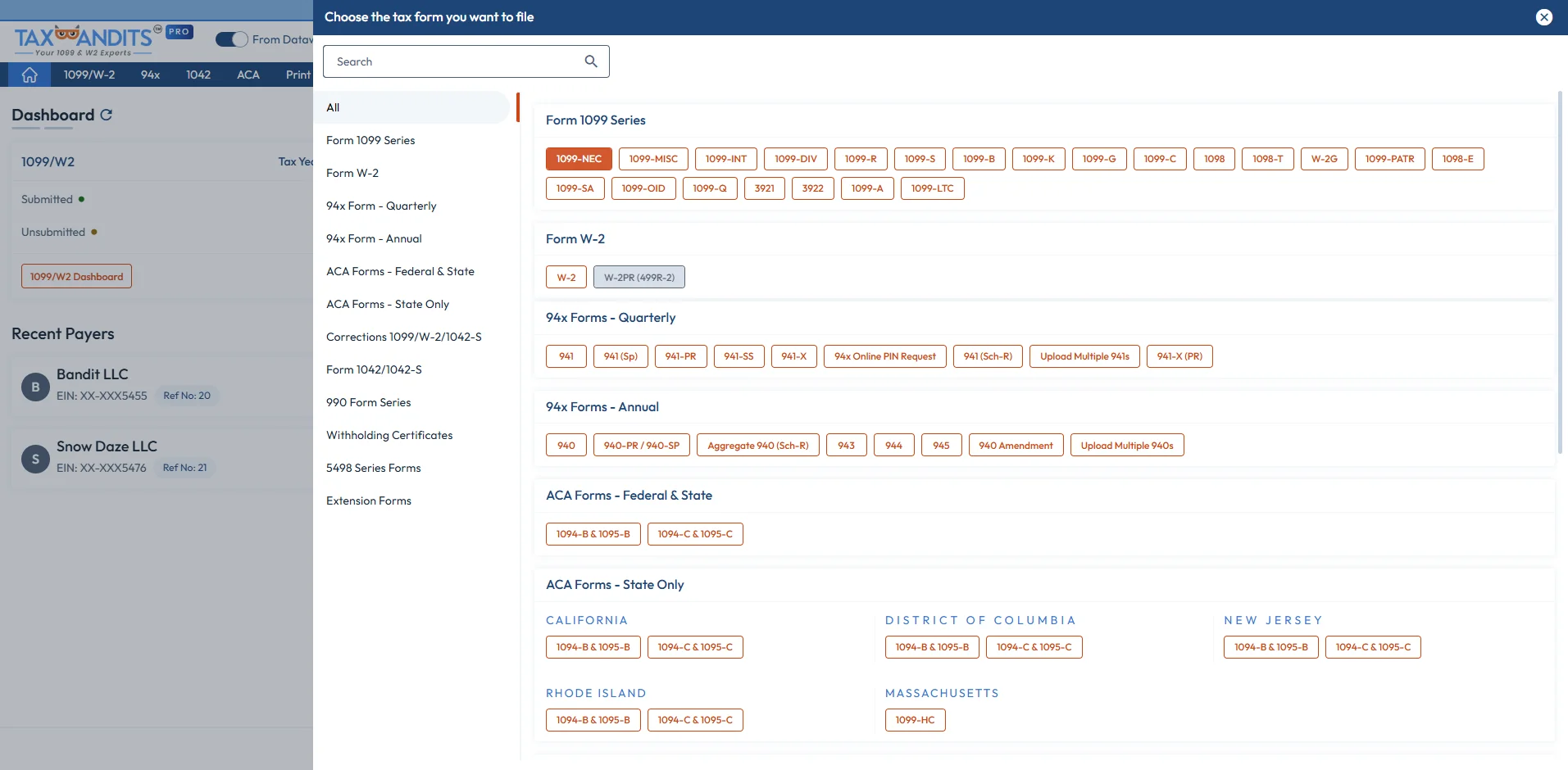
-
Step 1: Choose Form 1099
Select the type of 1099 form you want to file.
-
Step 2: Enter Form 1099 details
Complete the form using manual entry or other bulk import options.
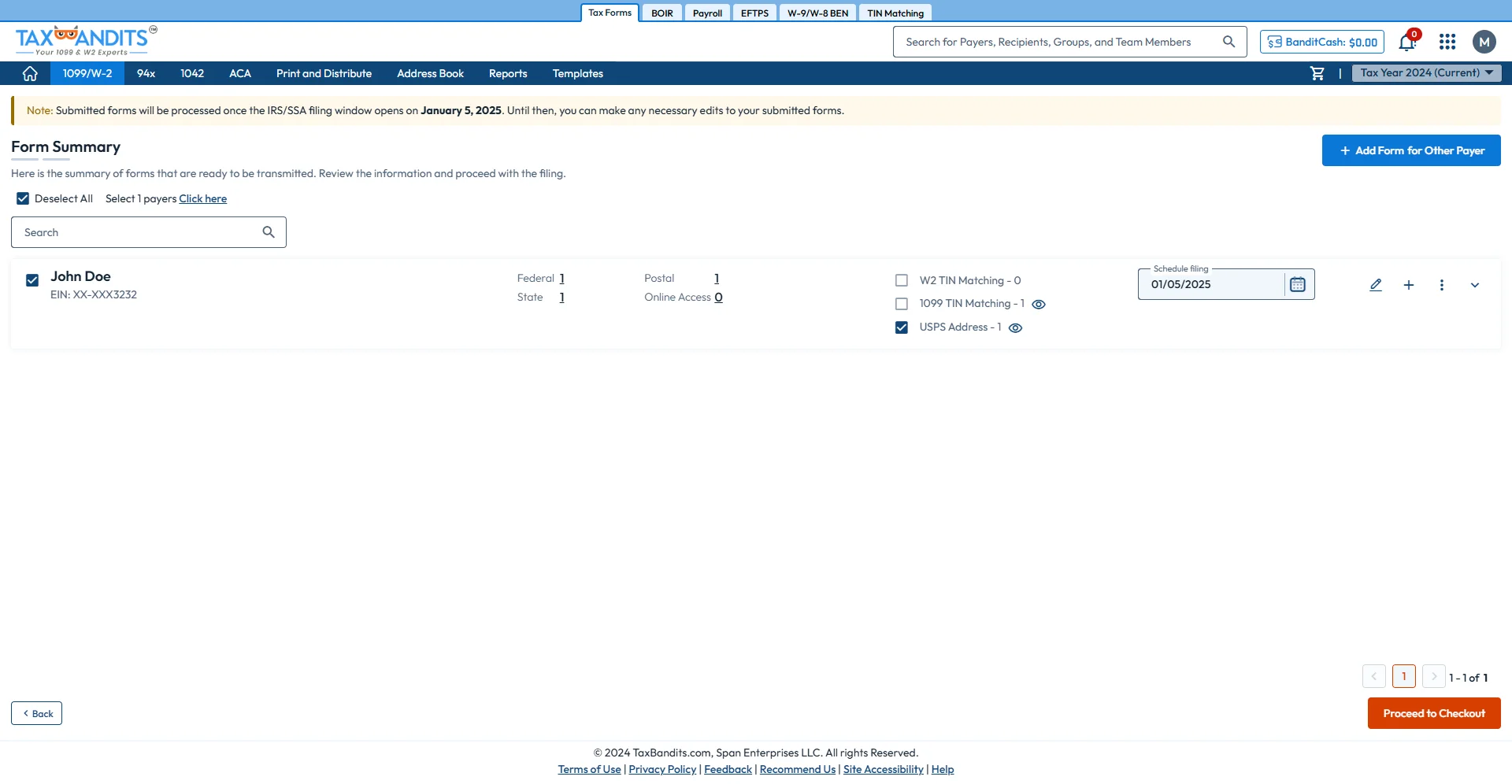
-
Step 3: Enter State Filing Information
Provide the required Kansas state details for Form 1099.
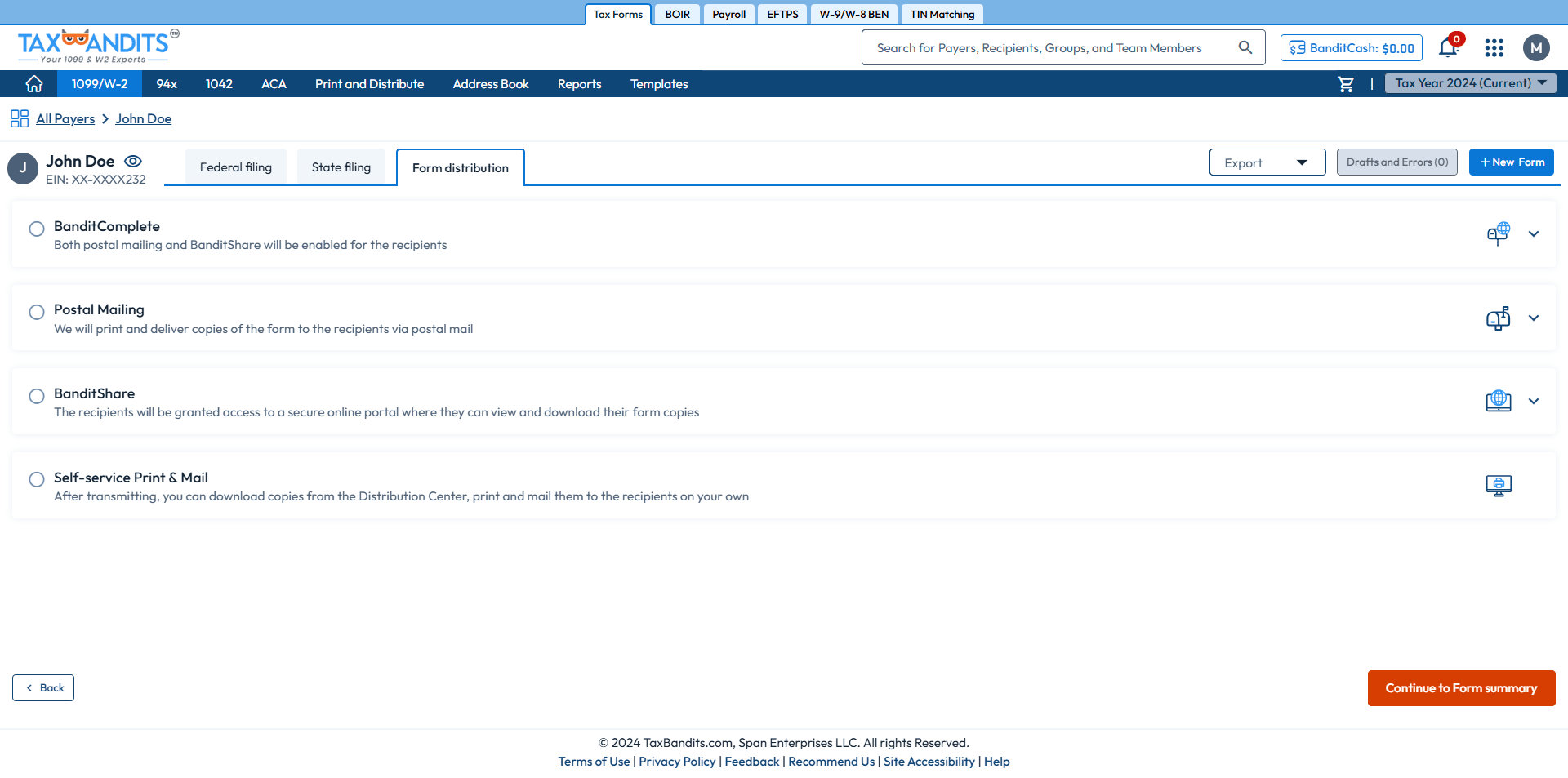
-
Step 4: Choose Distribution Options
Opt for our distribution services – Postal Mailing, Online Access, or Both.
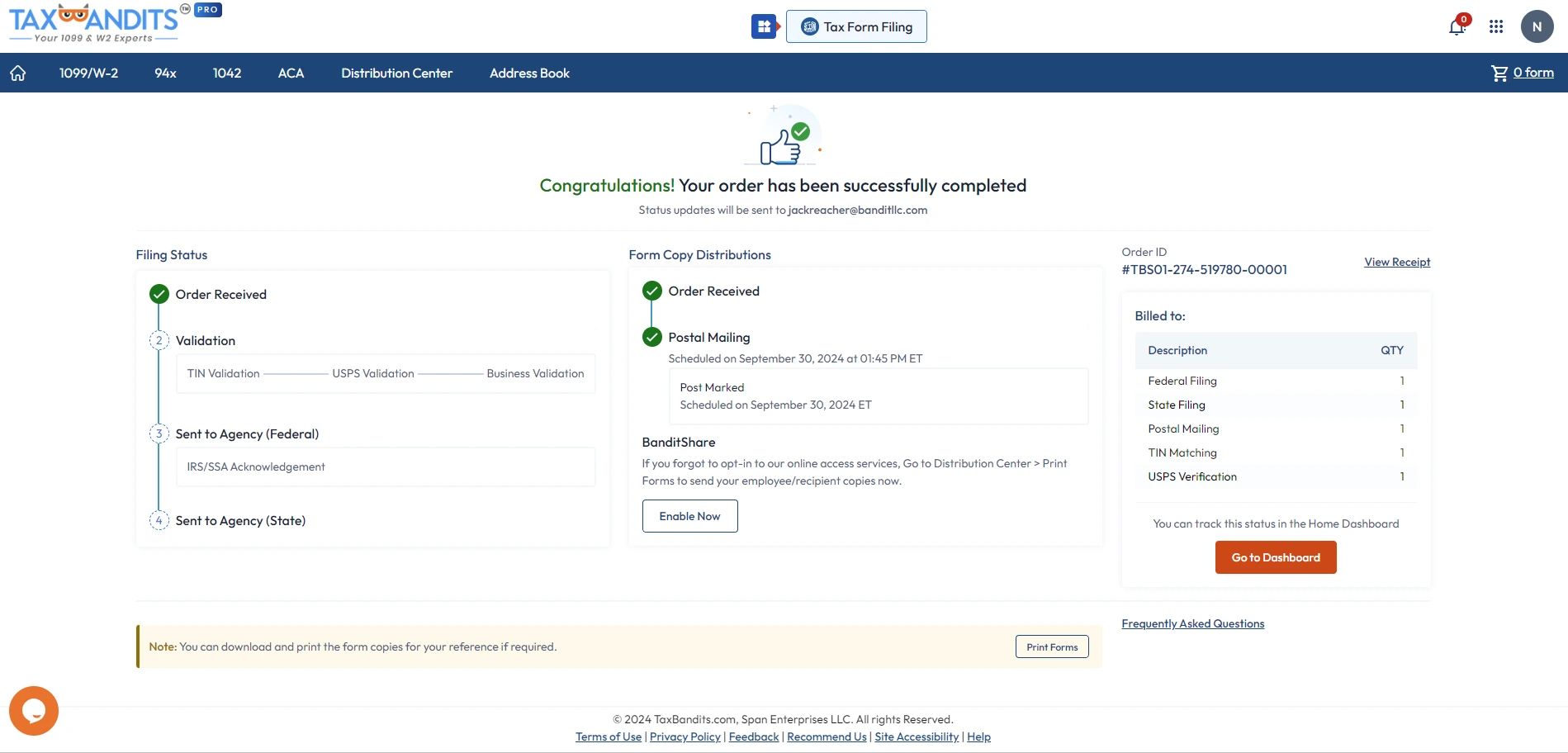
-
Step 5: Review and Transmit
Review your form and transmit it to the IRS and state agencies.
Are you ready to begin e-filing your 1099 Form with Kansas State? File in minutes with TaxBandits!
Frequently Asked Questions
Does Kansas require 1099 filing?
Yes, the state of Kansas is required to file Form 1099 for the taxable non-wage payments the Payer made during the tax year.
Is there a payment threshold for Form 1099 with Kansas?
Kansas generally follows federal reporting requirements for Form 1099 filing. Payers should determine their filing obligations based on the applicable federal reporting threshold for each form.
The IRS has updated the reporting thresholds for certain information returns for the 2026 tax year. For details on the revised thresholds, see our Form 1099 Changes for 2026 guide.
Does Kansas require the filing of Form 1099-NEC?
Yes. The State of Kansas requires Form 1099-NEC to be filed even if any non-employee compensation is paid to the payee during the year.
What types of 1099 forms does Kansas require?
Kansas requires the filing of the following 1099 forms:
Does Kansas require additional forms when filing 1099 forms?
Yes, Kansas requires you to file Form KW-3 (Annual Withholding Tax Return) when submitting 1099 forms that report Kansas state withholding. It serves as the annual reconciliation and must be filed electronically through the Kansas Department of Revenue (KDOR), even if you are submitting paper copies of 1099s.
- When e-filing 1099s: Include Form KW-3 with your submission.
- When paper filing 1099s: Attach Form 1096 and a copy of your electronically filed KW-3.
When is the Kansas 1099 due?
The filing deadline for Form 1099 is January 31.
If this due date falls on a weekend or federal holiday, the next business day will be the deadline.
What are the requirements to file a 1099 electronically with Kansas?
Yes, you can e-file your 1099s with the state of Kansas. Keep in mind that electronic filing is mandatory if you are filing 1099s for 51 or more payees.
What are the penalties for not filing or filing 1099 late with Kansas?
Kansas may impose penalties under the following circumstances:
Form 1099 penalties for Kansas
| Form 1099 | Penalty |
|---|---|
|
Late filing |
|
|
Late payment of taxes |
|
|
Underpayment of taxes |
|
Where do I mail Kansas 1099 forms?
Mail your Form 1099s to the following address.

KDOR - ELECTRONIC SERVICES
PO BOX 3506
TOPEKA, KS 66625-3506
If you made errors on 1099 forms filed with the State of Kansas, you can correct them by downloading the corrected form and mailing it to the address provided above.

Success Starts with TaxBandits
The Smart Business Owners Choice