
 BanditAI
Turn Paper W-9s Into Filing-Ready Data
With Smart Extraction
Already collected W-9s on paper or as PDFs? Upload them in batches, and AI-powered extraction captures names, addresses, and TINs automatically. Review the results, then add recipients to your Address Book.
- AI reads paper and PDF W-9s
- You review before you use
W-9 DOCUMENTS


EXTRACTED DATA

- NameMaria Lopez
- AddressAustin, TX
- TIN•••4821
SMART EXTRACTION OVERVIEW
What Is Smart W-9 Extraction?
Smart Extraction uses AI to read the W-9s you’ve already collected and turn them into structured recipient data. Scan paper forms or upload PDFs, review the extracted details, and use them for 1099 filing without keying each one in.
What You Get From Every Upload
Ready to use
Download as CSV or add recipients to your Address Book.
USE CASES
Built for Teams Sitting on a Stack of W-9s
Whether the forms are in a filing cabinet or a shared drive, here’s how each team puts Smart Extraction to work.

Multi-client intake
Accounting Firms and CPAs
Clients send W-9s in every format. Upload them in batches and review every vendor’s details in one place.

Year-end 1099 prep
Businesses and Finance Teams
Contractor W-9s pile up all year. Extract them once instead of typing each name, address, and TIN.

Multi-payer processing
Payroll and Tax Service Providers
Forms arrive for many payers at once. Extract the details and add recipients to each payer in bulk.

Vendor onboarding
Accounts Payable Teams
New vendors send W-9s as scans. Pull their tax details into your records, or export them as CSV.

Legacy W-9 backlog
Enterprises and Multi-Entity Organizations
Years of W-9s sit across entities. Process them in batches and organize clean records for tax reporting.
WHY IT MATTERS
Why Smart W-9 Extraction Matters for 1099 Filing
Retyping W-9s is slow, and a single typo in a TIN can follow you onto a filed return.

No manual data entry
AI extracts names, addresses, and TINs from your W-9s, so nobody types them by hand.

Fewer keying errors
Confidence scores show where the AI is less certain, so you check those fields first.

Faster than one by one
Process a whole batch of W-9s in a single session instead of form by form.

Costs shown upfront
Preview eligible pages and estimated extraction costs before you proceed.
HOW IT WORKS
How Smart W-9 Extraction Works in TaxBandits
Four steps from a stack of W-9s to recipient records ready for filing.
AI does the reading. You do the final check. Review and correct every record before you use it.
FROM PDF TO RECIPIENT
Add Extracted W-9 Data to Your
Address Book
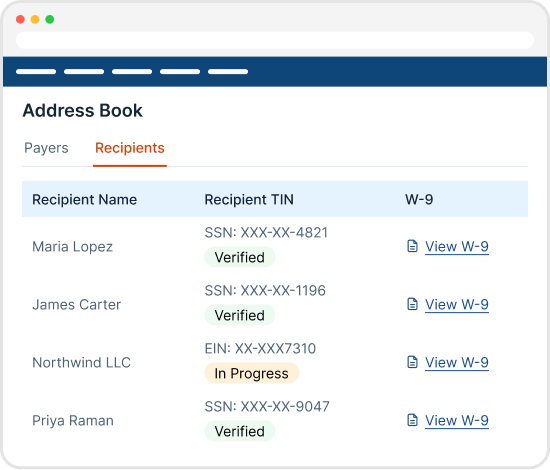
Once you’ve reviewed the extracted data, select a payer and add recipients to your Address Book individually or in bulk. Each recipient’s W-9 details stay available from their profile, so your tax information is organized and ready for 1099 reporting.
VALIDATE BEFORE YOU FILE
Validate Extracted TINs With IRS
TIN Matching
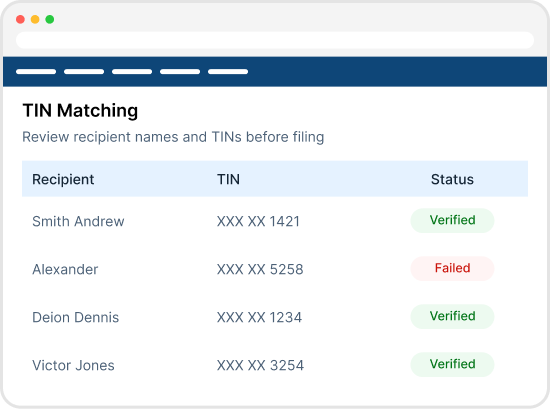
Extraction captures what’s on the W-9, but a typo or an outdated form can still put the wrong name or TIN on your return. Run your extracted recipients through IRS TIN Matching to catch mismatches before you file, not after the IRS sends a notice.
COLLECT W-9S
Don’t Have W-9s Yet? Request Them Online
Smart Extraction is for forms you already have. For the rest, TaxBandits gives you
several ways to collect W-9s and bring your recipient data in.
Request W-9s online
For recipients who haven’t sent a form yet

Email or text request
Send recipients a secure request by email or text, and they complete their W-9 online.

Public collection link At scale
Embed one link on your website or onboarding flow to collect W-9s from many people at once.

W-9 API Automation
Automate W-9 collection inside your own platform, with no manual requests to send. Explore the API →
Bring in your recipient data
Import payers and recipients, then request W-9s

CSV upload
Import your payer and recipient lists in one file, then request W-9s from them.

Copy and paste
Paste recipient details straight from a spreadsheet. No file formatting needed.

Accounting integrations
Import payers and recipients from your books, then request W-9s.
- QuickBooks
- Xero
- Zoho Books
- FreshBooks
However your W-9s arrive, the next steps are the same: review the data,
match TINs, and file.
Frequently Asked Questions
Yes. Smart Extraction uses AI to read your W-9 documents and extract recipient details into structured fields. You review and correct the results before you use them.
Yes. Scan your paper W-9s to PDF and upload them. Smart Extraction supports PDF files only.
Yes. We recommend reviewing every record before you use it. Confidence scores show which fields to check first.
You can see the eligible page count and estimated extraction cost before you proceed.
Yes. You can upload multiple W-9 PDF documents in a single session and process them together.
Smart Extraction supports PDF files only. Password-protected PDFs and unsupported file formats cannot be processed.
Yes. Smart Extraction analyzes individual pages within uploaded PDFs and identifies pages containing W-9 information for extraction.
Yes. You can review mapped and unmapped fields, manually enter missing information, and correct extracted values. Saved changes remain available when you revisit the extracted data.
Yes. You can add recipients individually or in bulk by selecting the associated payer. The extracted W-9 information will be accessible through each recipient’s profile.
Stop Retyping W-9s. Start Filing.
Upload your W-9s, review the AI-extracted data, and add recipients to your Address Book.
- AI extraction, human review
- Estimated cost shown before extraction


